EightPercent AI
⚡ Limited Lifetime License — Now Available
EightPercent AI issues a maximum of 50 Copy Trade licenses. Once issued, this access tier closes permanently.
48
Licenses Remaining
EightPercent AI

Automated Tradovate Copy Trading

Trade the S&P 500 E-mini using the same AI-driven strategies deployed by EightPercent. Trade Engine Pro automatically executes Conservative (CS01) and Aggressive (AS01) strategy signals directly through Tradovate, with dedicated-account routing available for each strategy — fully managed, no NinjaTrader required. The application lets the client choose Conservative (CS01), Aggressive (AS01), or Combined operation and choose Monthly Goal or All Trades. The A Filter is a daily strategy-status input; when AS01 is filtered OFF, the client must disable the Aggressive strategy in the app.

Lifetime License Fee
$50,000
One-time. No recurring fee.
Trading Capital Required
$50,000
Per 10-contract block. Scales in $50K blocks.
Monthly Objective
$8,000
Goal mode: $4,000 CS01 + $4,000 AS01 independent goals.
Infrastructure Cost
~$70
Per month. Paid to third parties.
The strategy framework targets $8,000 per month per $50,000 deployment block using independent $4,000 goals for CS01 and AS01. Actual results vary and the monthly objective is not guaranteed.
$1,250 one-time onboarding fee covers server setup, installation, testing, and training session.
Platform
Tradovate
Live and demo account support
Client Strategy Control
C • A • Combined
Choose Monthly Goal or All Trades and enable or disable strategies based on the daily framework.
Licenses Remaining
48 of 50
Maximum 50 lifetime licenses. Permanently closed when full.
How TradeAgent Copy Trading Works

Trade Engine Pro connects your Tradovate account environment to the EightPercent trading servers and automatically executes approved strategy signals. The application supports dedicated account routing for CS01 and AS01, monitors connection health, tracks daily results, and provides pause and emergency flatten controls.

🏦
Step 1
Tradovate Account
Client opens or uses existing Tradovate accounts
🔑
Step 2
API Add-On
Client enables the Tradovate API add-on and generates credentials
🖥️
Step 3
Chicago VPS
Chart VPS Alpha Chicago server is provisioned for low-latency execution
⚙️
Step 4
TradeAgent Install
EightPercent installs and verifies the app configuration
No NinjaTrader required
Trade Engine Pro is designed for clients who want a managed copy-trading setup without running NinjaTrader strategies directly.
The Trade Engine Pro Application

Once installed on your Chicago VPS by EightPercent, Trade Engine Pro runs as a standalone execution application. It connects directly to EightPercent's strategy servers and supports a dedicated Tradovate account for each strategy. This structure allows Conservative (CS01) and Aggressive (AS01) signals to execute independently without the same-account sequential entry issue that can occur when two strategies fire at the same time.
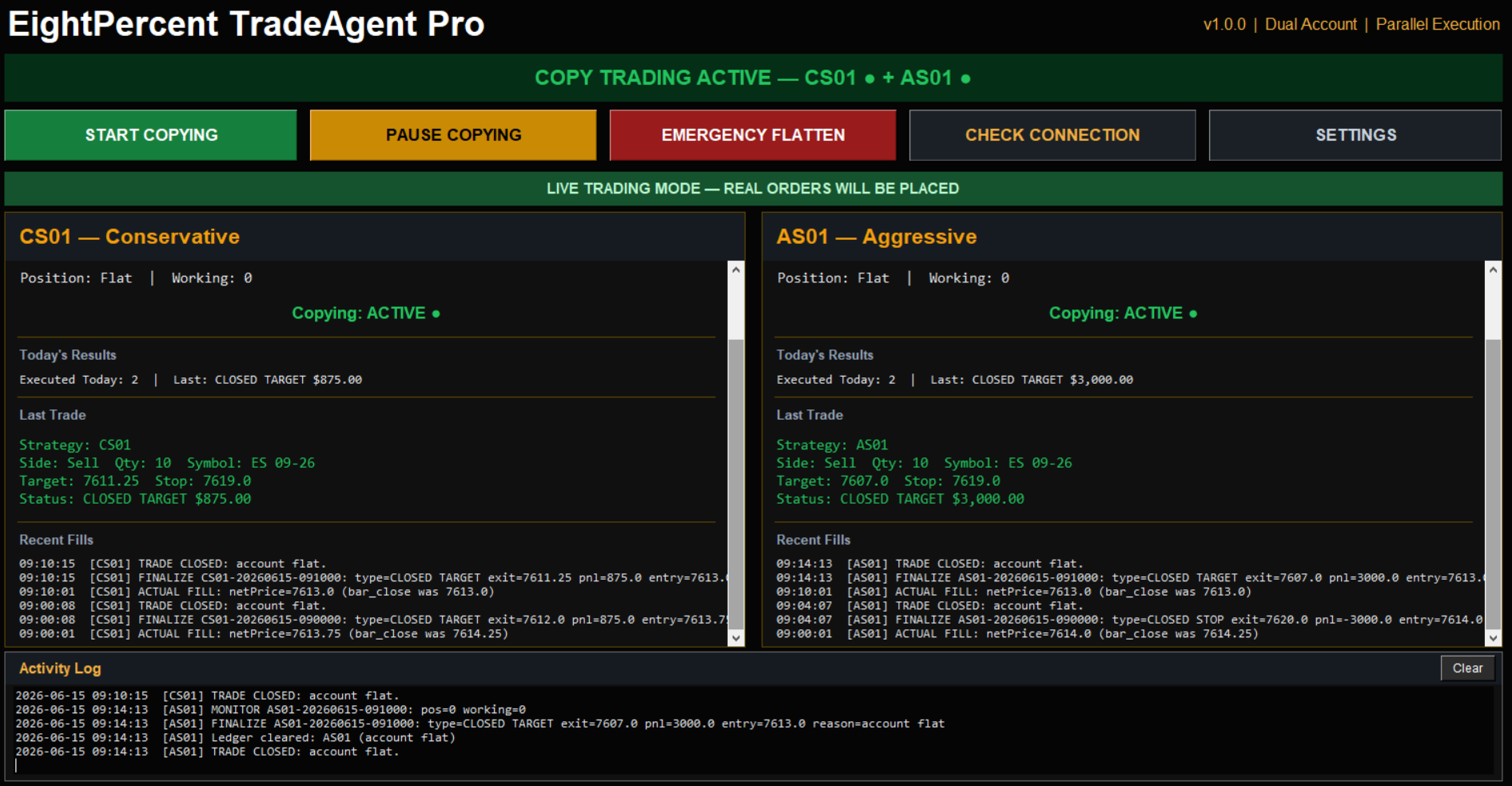
EightPercent Trade Engine Pro Application Interface
Dedicated Account Routing
Assign CS01 and AS01 to separate Tradovate accounts under the same setup
Independent Strategy Execution
Each strategy can enter, manage, and exit using its own account path
Connection Status
Server, WebSocket, and Tradovate health monitored continuously
How You'll Use It — The Monthly Workflow

Trade Engine Pro is designed to give the client daily control of strategy participation. The client may trade CS01, AS01, or both, and may choose the Monthly Goal framework or All Trades. Under the filtered framework, the client reviews the daily A Filter status and disables AS01 when the filter is OFF.

1
Start of Month — Launch Trade Engine Pro Open Trade Engine Pro on your Chicago VPS. The application connects automatically to EightPercent's strategy servers and begins monitoring for signals.
2
Select the Daily Trading Configuration Choose CS01, AS01, or Combined and choose Monthly Goal or All Trades. Review the current A Filter status before enabling AS01 for the trading session.
3
Follow the Selected Trading Method In Monthly Goal mode, the $4,000 per-strategy monthly goals define when that strategy should be stopped for the remainder of the month. In All Trades mode, the client continues taking eligible strategy trades rather than applying the monthly goal stop.
4
Client Controls Strategy Participation The client makes the strategy decision daily. When the A Filter is OFF, the client must turn off AS01 in Trade Engine Pro; when it is ON, the client may enable AS01 according to the selected strategy and trading method.
Capital Protection by Design
Trade Engine Pro provides the execution controls, while the client determines which strategy configuration to run each day. The A Filter does not automatically disable AS01 in the client application; the client must turn AS01 off when the filter is OFF. No contracts are automatically reallocated to CS01.
Who Is This For?
  • High-net-worth individuals seeking fully automated, passive futures exposure
  • Family offices looking for a managed, disciplined monthly income strategy
  • Investors who want institutional-grade execution without managing a trading desk
  • Tradovate account holders seeking Conservative, Aggressive, or Combined strategy exposure
  • Clients who prefer a fully managed setup with separate strategy-account routing available
Required Setup
Required Item Estimated Monthly Cost
Chart VPS Alpha Chicago Server $70/month
Tradovate API Add-On $25/month

These costs are paid directly to the third-party providers and are separate from any EightPercent subscription or service fee.

Strategy Options
Conservative (CS01)
A lower drawdown strategy designed to emphasize consistency. CS01 has historically produced a higher win rate and smoother equity growth while targeting more moderate returns.
Aggressive (AS01)
The Aggressive strategy can be selected independently or as part of Combined operation. The client reviews the daily A Filter status and must disable AS01 when the filter is OFF. In Monthly Goal mode, AS01 uses its $4,000 monthly goal per 10-contract block; All Trades is also available.
Combined
Run CS01 and AS01 together using dedicated Tradovate accounts. The client chooses Monthly Goal or All Trades and makes the daily strategy-selection decision. When the A Filter is OFF, the client must disable AS01. No contracts are automatically reallocated between strategies.
Dedicated Account Strategy Routing

Trade Engine Pro is designed to support a dedicated Tradovate account for each active strategy. This allows Conservative (CS01) and Aggressive (AS01) to operate through separate account paths while still being managed from the same copy-trade environment.

Conservative Account Aggressive Account
Runs CS01 independently Runs AS01 independently
Lower drawdown / higher win-rate profile Higher return / higher drawdown profile
Separate order path Separate order path
Why Dedicated Accounts Matter

When both strategies generate signals at the same time, dedicated Tradovate account routing allows each strategy to submit and manage its own orders separately. This configuration helps prevent the single-account sequential entry issue that can occur when multiple strategies share one execution account.

Reserve Your License

48 of 50 lifetime licenses remain. Schedule a strategy call to review requirements, confirm capital readiness, and have EightPercent configure your TradeAgent environment.

Total to get started: $50,000 license + $50,000 trading capital + $1,250 onboarding + ~$70/month infrastructure.

Monthly Performance Track Record

The table below displays the C/A Filtered Monthly Goal performance framework from the EightPercent master tracker. Results are normalized to a $50,000 deployment block using 10 CS01 contracts and 10 AS01 contracts when AS01 is enabled under the A Filter. This track record represents the Monthly Goal methodology; the application also allows the client to select All Trades. Hover over a combined result to view the strategy breakdown.

Loading track record...
© 2026 EightPercent AI · All Rights Reserved · Home · Pricing · Terms & Conditions